Online Booking

RV Inspection Scheduling Software With Online Booking

Add an online booking form to your own website in minutes. Customers choose services and a preferred time, and you confirm each request onto your schedule in one click.

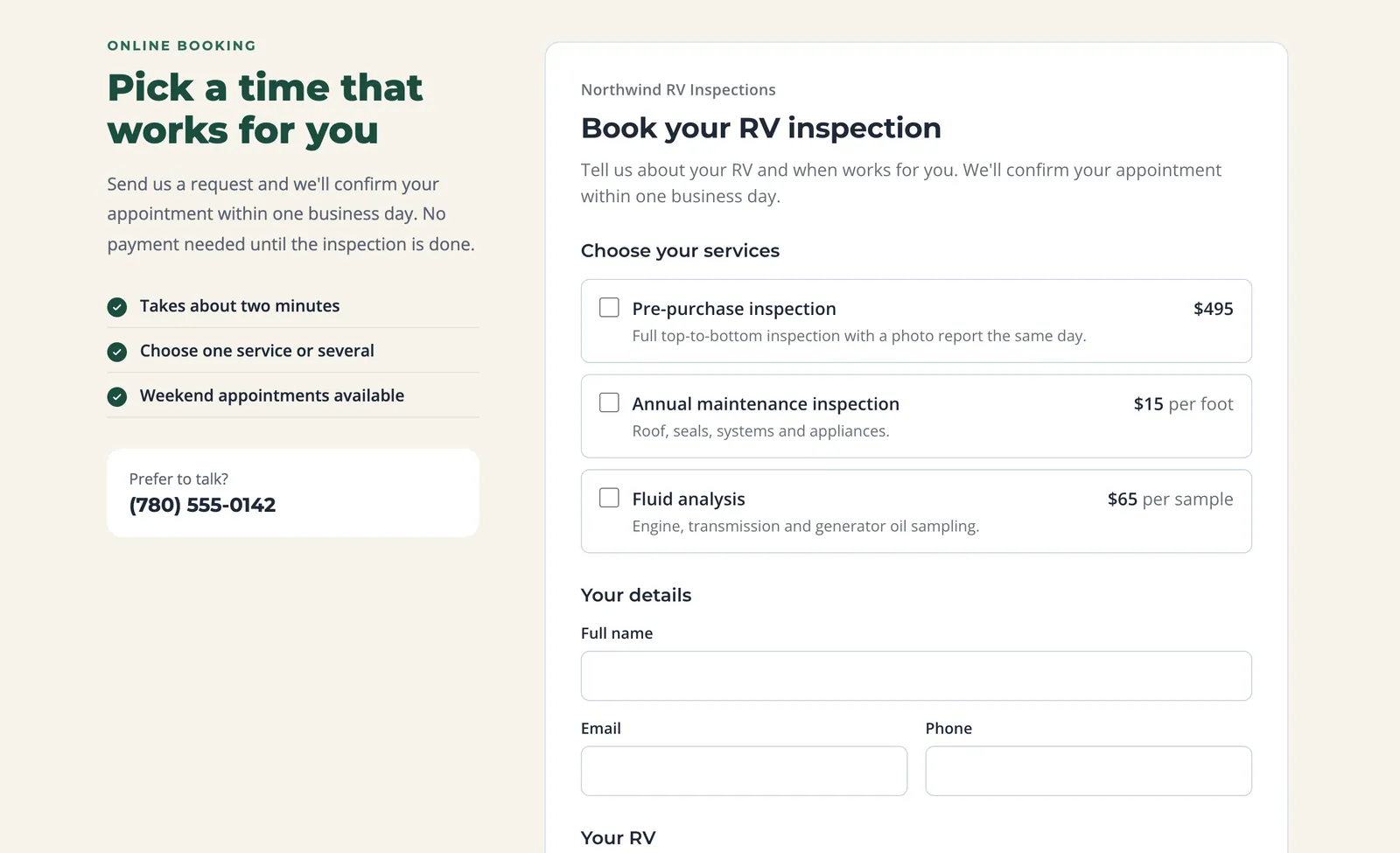
WanderWise online booking form embedded on an RV inspection company's website, showing services with prices and the customer's details
A WanderWise booking form on an RV inspector's website, set up in the site's own colors and fonts. Example company and data.

Stop booking RV inspections by phone tag

Most RV inspection jobs start with a phone call you can't take, because you are on a roof, under a slide-out, or driving to the next job. By the time you call back, the buyer has booked someone else. WanderWise online booking puts a booking form on your own website, so customers can request an inspection or service call the moment they find you, day or night.

Customers choose the services you offer, see your prices, pick a preferred date and time of day, and tell you about the RV and where it is parked. You get a push notification and an email, review the request in the web portal, and confirm it onto your schedule in one click. The customer gets a confirmation email with the date and time, and your inspection agreement to sign if you require one.

Scheduling RV inspections is rarely as simple as picking an open slot. A pre-purchase inspection often depends on a dealer's lot hours or a private seller's availability, the RV may be in storage two towns away, and a 40-foot fifth wheel takes longer than a camper van. That is why WanderWise booking is request-based: customers tell you what they need and when suits them, and you confirm the real appointment once you have checked travel, access and job length.

Booking connects straight to the rest of WanderWise: the confirmed job appears in the RV inspection app with the customer and RV details already filled in, ready for the inspection and the report.
How Online Booking Works

  1. 01

    Add the form to your website

    Paste one line of code into WordPress, Wix, Squarespace or GoDaddy, or share your booking link on Google, Facebook or by text.

  2. 02

    Customers send a request

    They choose services, a preferred date and time of day, and describe the RV and its location. You get a push notification and an email.

  3. 03

    Confirm it in one click

    Schedule the request with everything prefilled. It lands on your calendar and in the mobile app, and the customer gets a confirmation email.

For mobile RV technicians too

The same booking form works for service calls. List de-winterizing, roof reseals, propane checks or diagnostics as services with your own prices, ask where the RV is parked and whether hookups are available, and confirm each call onto your day. See how WanderWise handles the rest of the job in our mobile RV technician software, from VIN capture to the service report.

Your Brand, Not Ours

Style it to fit your website

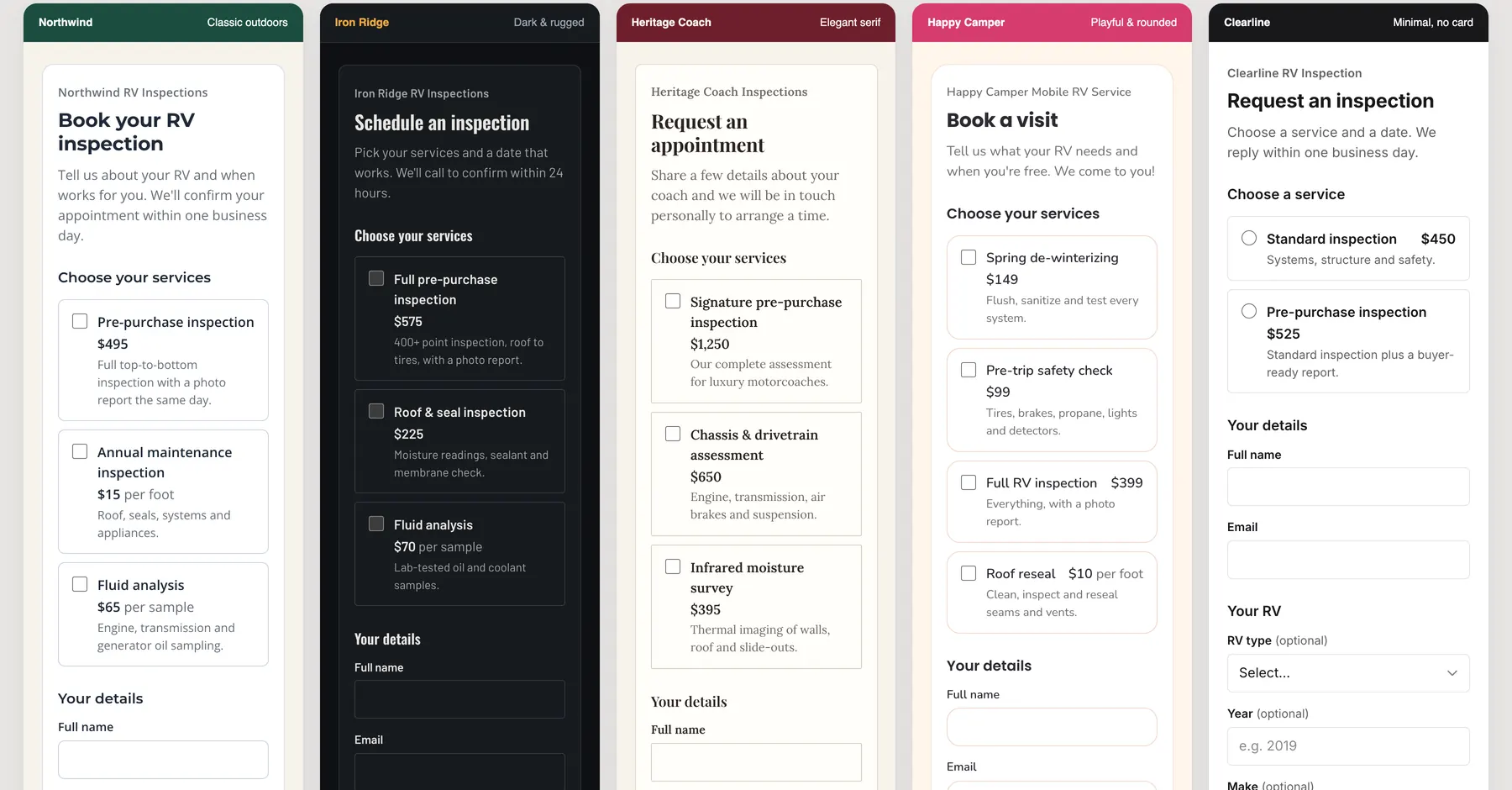
Set any color your site uses, choose from more than 1,800 Google Fonts, and adjust text size, heading style, corner shapes and buttons so the form looks like part of your site instead of a third-party widget. In Chrome and Edge, Pick from screen copies a color straight from your own website. Here is the same WanderWise booking form styled for five very different inspection websites.

The same WanderWise booking form styled five ways: classic green, dark with amber buttons, elegant serif, playful rounded pink, and minimal black and white
Five example inspection websites, each with its own form style.
Your Form, Your Questions

A booking form that asks the right RV questions

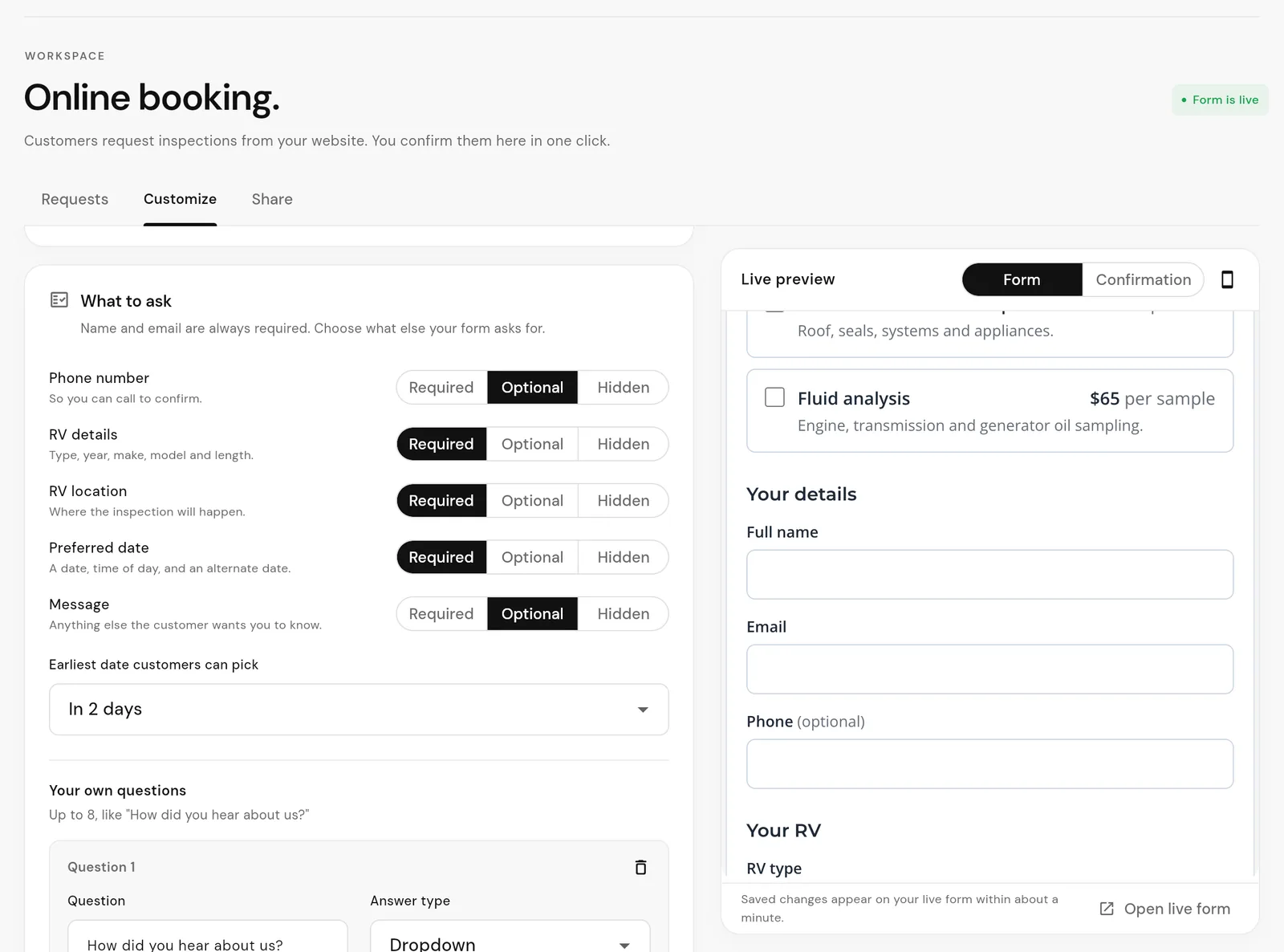
Set up the form in the Customize tab of the web portal and watch the live preview update as you go. Choose every color, font and corner shape yourself so the form fits your site.

  • Your services, prices and price notes such as “per foot”
  • Up to eight questions of your own: dropdowns, checkboxes or text
  • RV type, year, make, model and length, plus where the RV is parked
  • A preferred date, time of day and alternate date, with the minimum notice you need
  • Choose whether each field is required, optional or hidden
  • Your own title, introduction, button text and thank-you message
WanderWise portal booking form editor setting phone, RV details, RV location, preferred date and message to required, optional or hidden, with a minimum notice and a custom question, beside a live preview of the form
The Customize tab in the WanderWise web portal, with a live preview. Example data.
Requests

Every booking request in one place

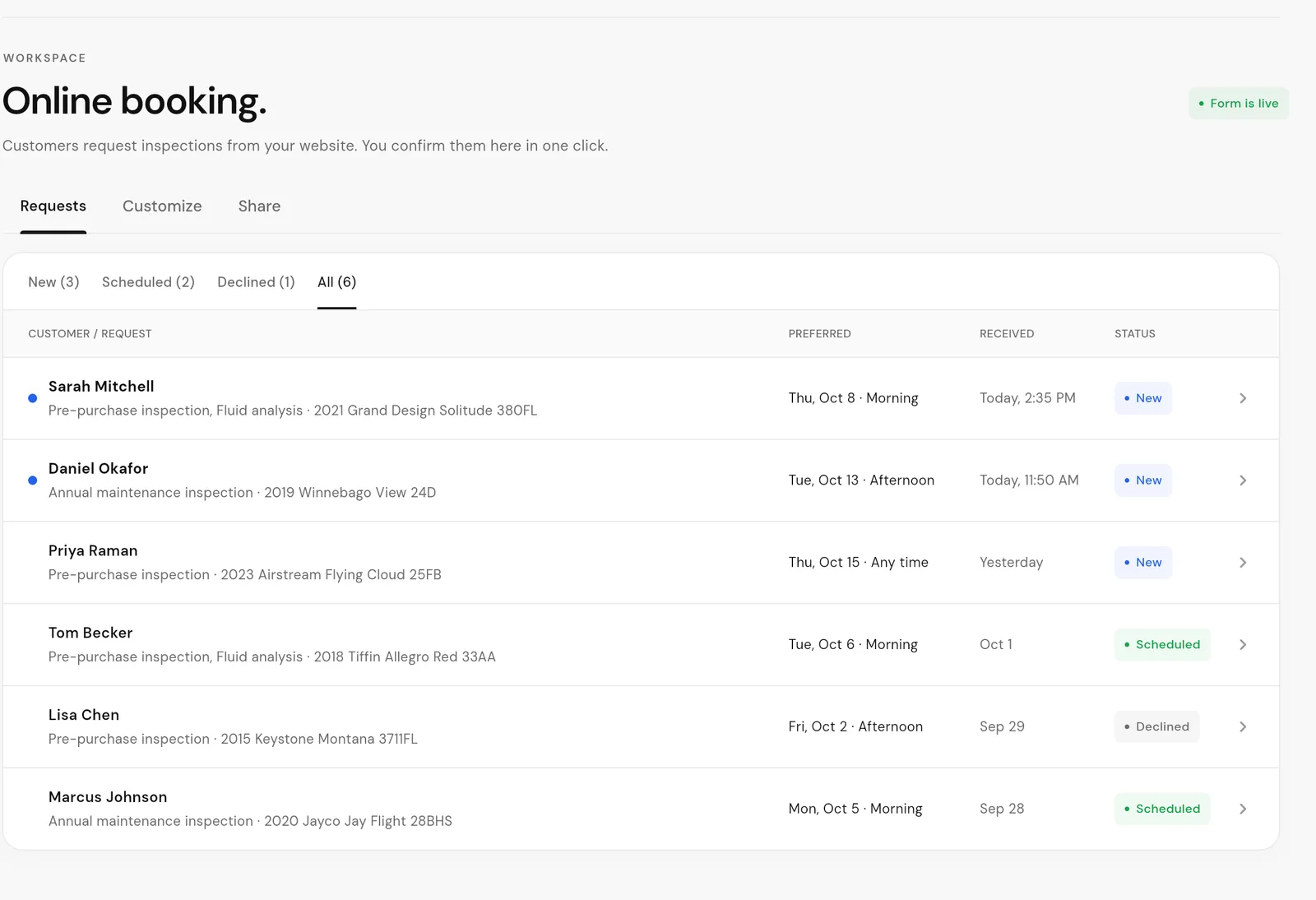
New requests arrive in the Online booking page of the WanderWise web portal, with a push notification on your phone and an email to the address you choose. Each one shows the services, preferred date and time, RV, location and the answers to your questions, with one-tap email and call shortcuts.

Filter by new, scheduled and declined, and give your whole team access: every team member sees the same requests.

WanderWise portal list of online booking requests with customer names, requested services, RVs, preferred dates and New, Scheduled or Declined status
Booking requests in the WanderWise web portal. Example data.
Scheduling

Confirm a request onto your schedule in one click

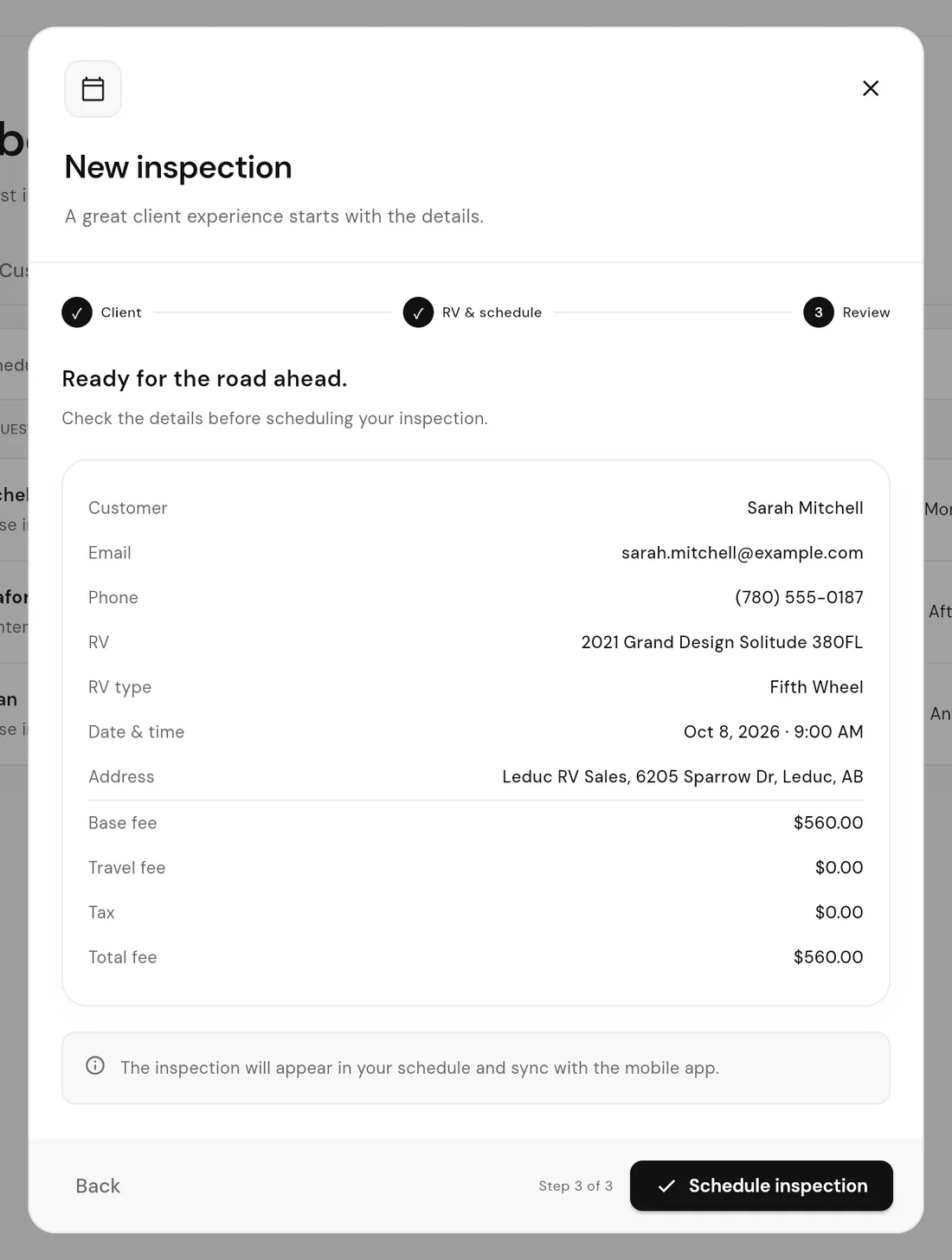
Choose Schedule inspection and the request becomes a new inspection with the customer, RV, location, preferred time and quoted prices already filled in. Change the time or add a travel fee before you save.

The inspection appears on your Dashboard and in the WanderWise mobile app, ready for the job. Online booking is request-based: customers suggest a date and time of day, and you confirm the actual appointment, so you stay in control of travel time and job length.

WanderWise New inspection review step prefilled from an online booking request with the customer, RV, date and time, address and fees
Scheduling a request: every detail is filled in from the booking. Example data.
Confirmations and Agreements

Get your inspection agreement signed before you arrive

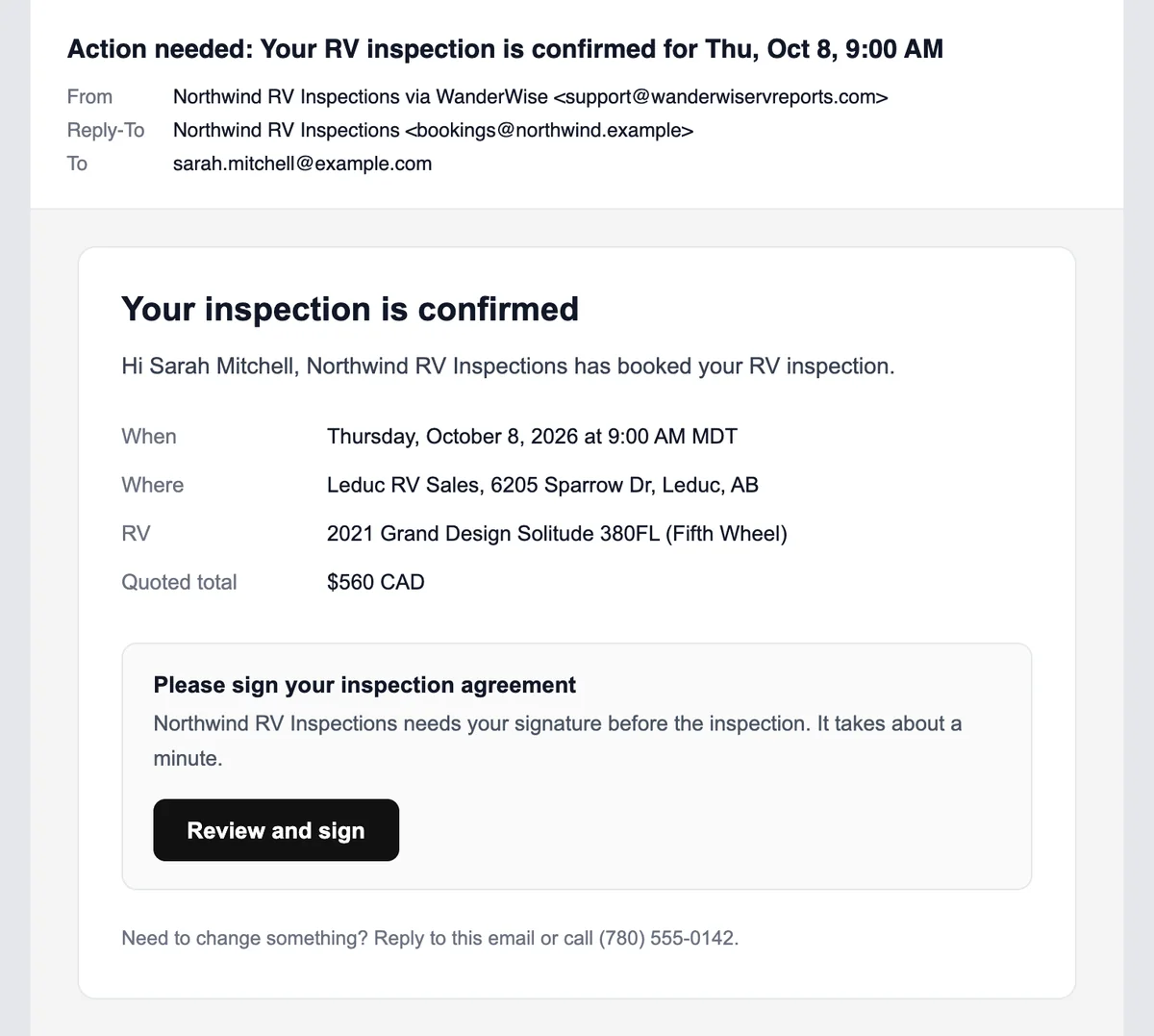
When you schedule a request, the customer gets a confirmation email with the date, time, address, RV and quoted total. When they reply, it goes to your business email.

If your business uses an inspection agreement, turn on Require a signed agreement. The agreement is filled in with the booking details and goes out in the same email, the customer signs it online, and you get a notification when it is signed. Not sure what yours should cover? Read what to include in an RV inspection agreement.

Booking confirmation email showing the RV inspection date, time, address, RV and quoted total, with a Review and sign button for the inspection agreement
The customer's confirmation email with an agreement to sign. Example data.
Add It Anywhere

Add it with one line of code, or share the link

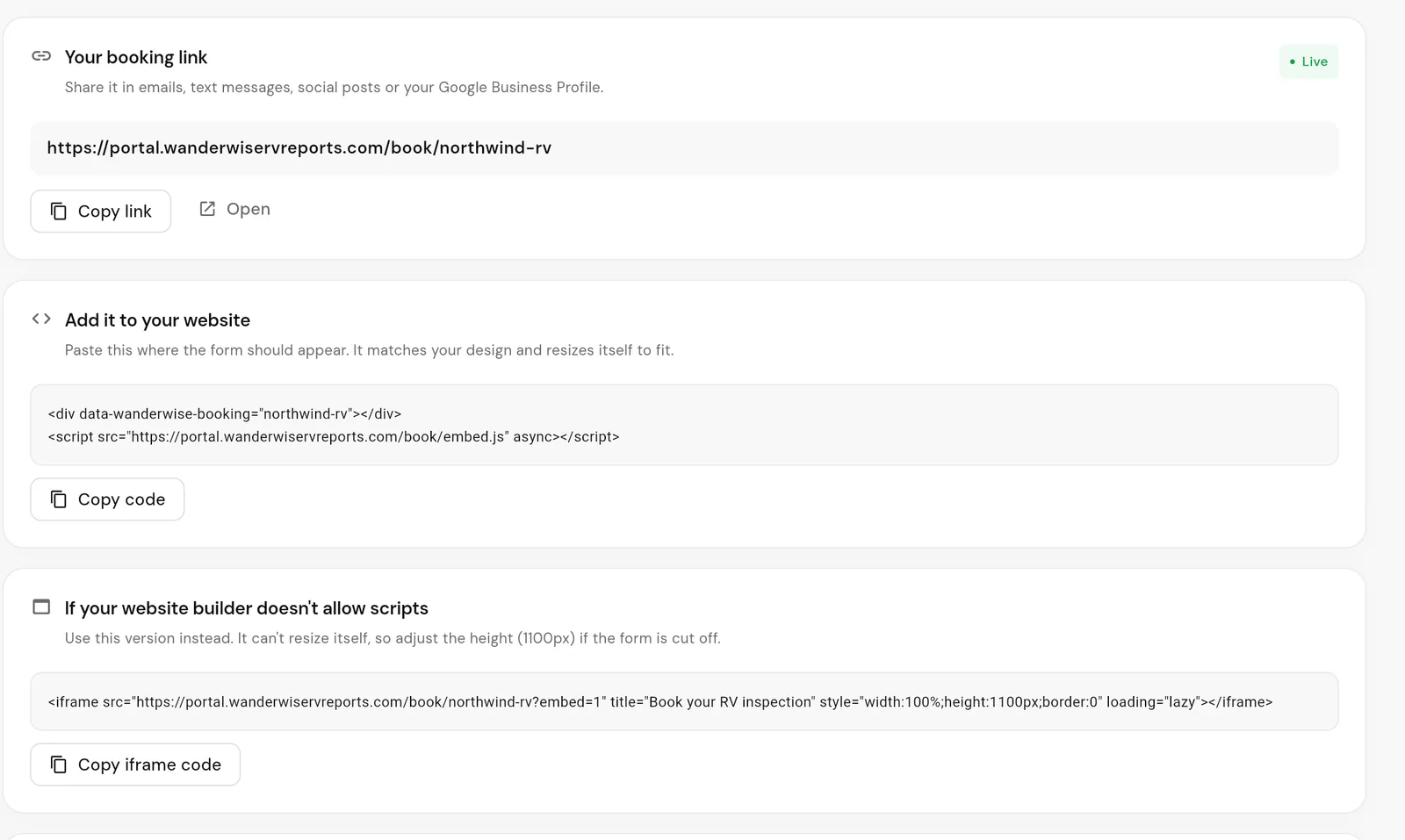
Paste one line of code where the form should appear and it resizes itself to fit your page. Step-by-step instructions cover WordPress, Wix, Squarespace and GoDaddy, and an iframe version is included for website builders that do not allow scripts.

No website? Share your booking link on your Google Business Profile, Facebook page, Instagram bio, email signature or in a text message. The form works on any phone, tablet or computer, and built-in spam protection helps keep junk requests out of your inbox.

WanderWise Share tab with the booking link, a one-line website embed code and an iframe code for website builders
Your booking link and embed codes. Example data.
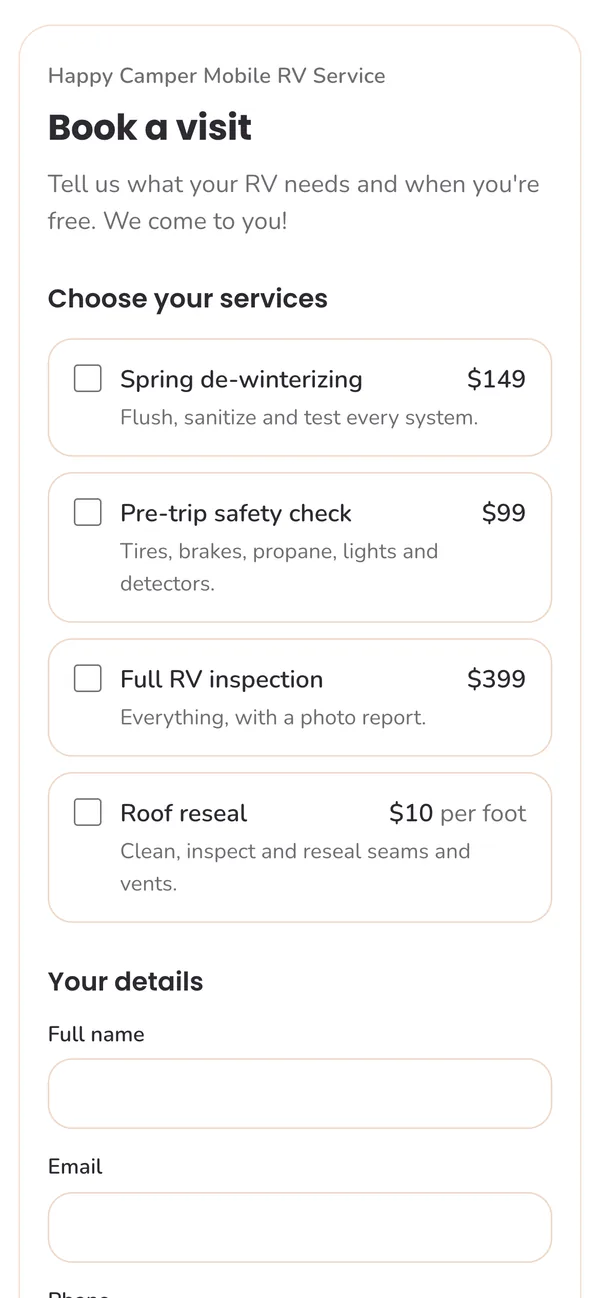
WanderWise booking form on a phone with rounded pink styling, listing RV services and prices
The same form on a phone.

Everything You Need to Take Bookings Online

  • Your services and prices

    List up to 20 services with optional prices and notes, and let customers choose one or several.

  • Your questions

    Ask how they found you, where the RV is stored, or anything else your bookings need.

  • Minimum notice

    Set how much notice you need, from same-day requests to a month ahead.

  • Team notifications

    Push notifications for your team and request emails to the address you pick.

  • Customer confirmations

    A received email when they send a request and a confirmation when you schedule it.

  • Included in your plan

    Online booking comes with every WanderWise subscription and the 30-day free trial.

GOOD QUESTIONS

RV Inspection Scheduling Questions

Talk to us
Can I add a booking form to my existing website?

Yes. Copy one line of code from the Share tab and paste it where the form should appear. It works with WordPress, Wix, Squarespace, GoDaddy and most other website builders, and an iframe version is included for builders that block scripts.

Do I need a website to take online bookings?

No. Every booking form has its own link that you can share on your Google Business Profile, Facebook page, Instagram bio, email signature or by text message.

Can customers book an exact time slot?

Customers choose a preferred date and time of day, plus an optional alternate date. You confirm the actual appointment time when you schedule the request, and the customer gets that time in a confirmation email.

Can I stop last-minute or far-off requests?

Yes. Set a minimum notice, from same-day requests to a month ahead, and customers can only pick dates from then on. Requests can be made up to a year in advance.

Can I style the booking form to fit my website?

Yes. Set any color by hex code, or copy one straight from your site with Pick from screen in Chrome and Edge. Choose from more than 1,800 Google Fonts, and adjust text size, heading style, corner rounding and button shape. Every change shows in a live preview before you publish.

How do I know when a booking request comes in?

You get a push notification in the WanderWise app and an email at the address you choose. Every request is listed on the Online booking page of the web portal for your whole team.

Can customers sign my inspection agreement online?

Yes. Turn on Require a signed agreement and your agreement goes out with the booking confirmation. The customer signs online and you are notified when it is signed.

Can I take deposits or payments through the booking form?

No. Online booking collects requests and sends confirmations. You take payment through whatever payment tool you already use.

Is online booking included in my subscription?

Yes. Online booking is included with every WanderWise subscription and during the 30-day free trial, with no per-booking fees.

Start Taking Bookings Online

Start a free 30-day trial, set up your booking form in minutes, and add it to your website today.